Case study
AI-Assisted PowerPoint Creator Runtime
A repository-scoped automation runtime that enables command-line AI agents to create, edit, extract, render, and quality-check professional PowerPoint presentations through repeatable, cross-platform workflows.
- Project context
- Personal Project
- Year
- 2026
- Categories
- AI Agent, Developer Tooling, Presentation Automation
- Source code
- View source code
- Technology stack
- Python, JavaScript, Node.js, PptxGenJS, MarkItDown, Office Open XML, LibreOffice, Poppler, Pillow
System design
A public-safe view of the components, integrations, and data flow described in this case study.
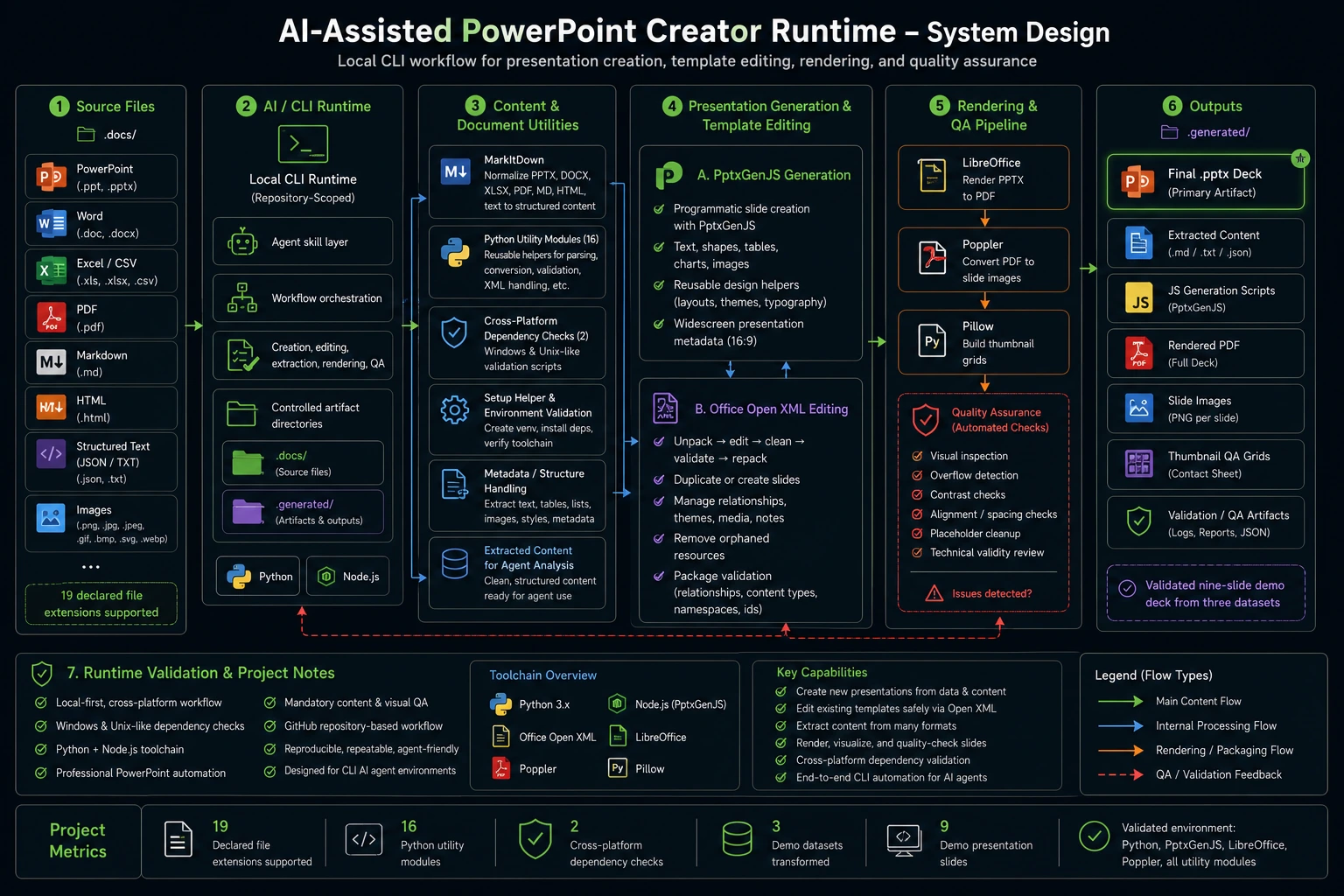
Scroll horizontally to inspect the full diagram, or open it full size.
Problem
Command-line AI agents can generate presentation content, but producing a reliable PowerPoint file requires more than writing slide text. The workflow must ingest different source formats, preserve Office document structure, generate consistent layouts, manage system dependencies, and detect visual defects such as overflow, poor contrast, misalignment, and leftover placeholders. Without a standardized runtime, these steps are fragmented, difficult to reproduce, and prone to producing presentations that are technically invalid or visually unusable.
Role
Abdul designed and assembled the repository-scoped runtime, integrated the Python and Node.js presentation toolchain, documented the agent workflow, and created cross-platform setup and dependency-validation utilities. Responsibilities included: - Defining the runtime architecture and repository conventions. - Integrating document ingestion, PPTX generation, and Office Open XML tooling. - Creating automated setup for Python and Node.js dependencies. - Providing Windows and Unix-like environment validation scripts. - Establishing mandatory content and visual QA workflows. - Producing and validating a data-driven demonstration presentation. - Improving presentation design guidance, including accessible color contrast.
Architecture
The project uses a local-first, layered architecture: 1. **Agent skill layer** Defines when presentation workflows should run, where source documents and generated artifacts belong, and the required creation, editing, and QA steps. 2. **Content-ingestion layer** Uses MarkItDown to normalize PowerPoint, Word, Excel, PDF, Markdown, structured text, and HTML sources into content suitable for agent analysis. 3. **Presentation-generation layer** Uses PptxGenJS to programmatically create widescreen presentations with text, shapes, tables, charts, images, reusable design helpers, and presentation metadata. 4. **Template-editing layer** Uses an Office Open XML workflow to unpack presentations, duplicate or create slides, modify XML, remove orphaned resources, validate package relationships, and repack the result. 5. **Rendering and QA layer** Uses LibreOffice to render presentations to PDF, Poppler to generate slide images, and Pillow to create thumbnail grids for visual inspection. 6. **Runtime-validation layer** Provides platform-specific checks for Python packages, PptxGenJS, LibreOffice, and Poppler before presentation work begins.
Implementation
The runtime establishes `.docs/` as the default source directory and `.generated/` as the controlled location for generated decks, scripts, extracted content, and QA artifacts. For new presentations, agents generate JavaScript with PptxGenJS and apply explicit layout, typography, chart, spacing, accessibility, and visual-design rules. For template-based work, the runtime follows an unpack–edit–clean–validate–pack pipeline. Python utilities manage slide relationships, content-type declarations, notes references, media files, themes, and other Open XML resources. XML parsing uses hardened libraries, while schema validation checks namespaces, identifiers, relationships, content types, layouts, and package references. The setup helper creates the working directories and virtual environment, installs declared dependencies, and invokes the correct dependency check for the host operating system. A public demonstration processes three related CSV datasets into a nine-slide analytical presentation containing an executive summary, methodology, charts, findings, limitations, and recommendations.
Results
The project delivered a repeatable end-to-end workflow for presentation automation inside CLI-based AI agent environments. Verified outcomes include: - Support for 19 declared document, text, structured-data, and image extensions. - Programmatic creation and template-safe editing within one runtime. - Automated dependency checks for both Windows and Unix-like environments. - Content extraction, package validation, rendering, and visual QA in one workflow. - A validated nine-slide demonstration deck generated from three related datasets. - Successful local verification of Python dependencies, PptxGenJS, LibreOffice, Poppler, and all Python utility modules.